Simple app using animation
This app demonstrates picture display and output, click on picture:
app/res/drawable - pictures
There is one images moved into here, called star.gif, a red star. The other is called empty.png and is an empty star.
app/res/values/strings.xml - strings
<resources>
<string name="app_name">Flood</string>
<string name="descPic">Picture for animation</string>
<string name="rotateText">Rotate</string>
<string name="xStretchText">Stretch X</string>
<string name="yStretchText">Stretch Y</string>
</resources>
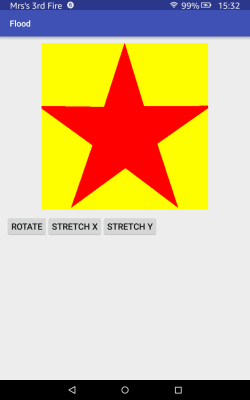
app/res/layout/activity_main.xml - screen format
<?xml version="1.0" encoding="utf-8"?>
<RelativeLayout xmlns:android="http://schemas.android.com/apk/res/android"
xmlns:tools="http://schemas.android.com/tools"
android:layout_width="match_parent"
android:layout_height="match_parent"
android:paddingLeft="@dimen/activity_horizontal_margin"
android:paddingRight="@dimen/activity_horizontal_margin"
android:paddingTop="@dimen/activity_vertical_margin"
android:paddingBottom="@dimen/activity_vertical_margin"
tools:context=".MainActivity">
<ImageView
android:id="@+id/starPic"
android:src="@drawable/star"
android:layout_width="wrap_content"
android:layout_height="wrap_content"
android:paddingBottom="@dimen/activity_vertical_margin"
android:contentDescription="@string/descPic"
android:layout_centerHorizontal="true"
/>
<Button
android:id="@+id/rotatetButton"
android:layout_width="wrap_content"
android:layout_height="wrap_content"
android:text="@string/rotateText"
android:onClick="doRotate"
android:layout_below="@id/starPic"
/>
<Button
android:id="@+id/xStretchButton"
android:layout_width="wrap_content"
android:layout_height="wrap_content"
android:text="@string/xStretchText"
android:onClick="stretchX"
android:layout_below="@id/starPic"
android:layout_toRightOf="@id/rotatetButton"
android:layout_toEndOf="@id/rotatetButton"
/>
<Button
android:id="@+id/yStretchButton"
android:layout_width="wrap_content"
android:layout_height="wrap_content"
android:text="@string/yStretchText"
android:onClick="stretchY"
android:layout_below="@id/starPic"
android:layout_toRightOf="@id/xStretchButton"
android:layout_toEndOf="@id/xStretchButton"
/>
</RelativeLayout>
app/java/com.(the project name)/MainActivity - main code for app
package com.edkins.flood;
import android.support.v7.app.AppCompatActivity;
import android.os.Bundle;
import android.view.View;
import android.view.animation.Animation;
import android.view.animation.AnimationUtils;
import android.widget.ImageView;
public class MainActivity extends AppCompatActivity {
protected void onCreate(Bundle savedInstanceState) {
super.onCreate(savedInstanceState);
setContentView(R.layout.activity_main);
}
public void doRotate(View view) {
ImageView starImage = (ImageView) findViewById(R.id.starPic);
Animation anim = AnimationUtils.loadAnimation(this, R.anim.rotate);
starImage.startAnimation(anim);
}
public void stretchX(View view) {
ImageView starImage = (ImageView) findViewById(R.id.starPic);
Animation anim = AnimationUtils.loadAnimation(this, R.anim.stretchx);
starImage.startAnimation(anim);
}
public void stretchY(View view) {
ImageView starImage = (ImageView) findViewById(R.id.starPic);
Animation anim = AnimationUtils.loadAnimation(this, R.anim.stretchy);
starImage.startAnimation(anim);
}
}
app/res/values/rotate.xml - animation for rotating image
<?xml version="1.0" encoding="utf-8"?>
<set xmlns:android="http://schemas.android.com/apk/res/android">
<rotate
android:fromDegrees="0"
android:toDegrees="360"
android:pivotX="50%"
android:pivotY="50%"
android:startOffset="100"
android:duration="1000" />
</set>
app/res/values/stretchx.xml - animation for stretch X axis
<?xml version="1.0" encoding="utf-8"?>
<set xmlns:android="http://schemas.android.com/apk/res/android">
<scale
android:fromXScale="0.5"
android:toXScale="1.4"
android:fromYScale="1.0"
android:toYScale="1.0"
android:pivotX="50%"
android:pivotY="50%"
android:duration="700" />
</set>
app/res/values/stretchy.xml - animation for stretch Y axis
<?xml version="1.0" encoding="utf-8"?>
<set xmlns:android="http://schemas.android.com/apk/res/android">
<scale
android:fromXScale="1.0"
android:toXScale="1.0"
android:fromYScale="1.0"
android:toYScale="1.4"
android:duration="700" />
</set>
Index to my other websites
© Jo Edkins 2016