Simple app using drag and drop
This app demonstrates picture display and output, click on picture:
app/res/drawable - pictures
There are two images moved into here. One is called star.gif and is a red filled-in star with yellow backgroun. The other is called empty.gif and is just yellow. Both are the same size.
app/res/values/strings.xml - strings
<resources>
<string name="app_name">Touch</string>
<string name="xsText">"start x = "</string>
<string name="ysText">" start y = "</string>
<string name="xmText">"moving x = "</string>
<string name="ymText">" moving y = "</string>
<string name="xeText">"end x = "</string>
<string name="yeText">" end y = "</string>
<string name="starText">"star"</string>
</resources>
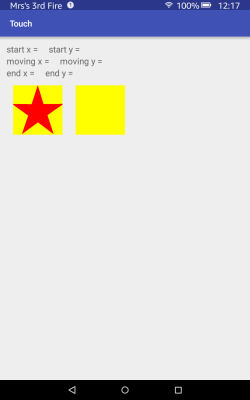
app/res/layout/activity_main.xml - screen format
<?xml version="1.0" encoding="utf-8"?>
<RelativeLayout xmlns:android="http://schemas.android.com/apk/res/android"
xmlns:tools="http://schemas.android.com/tools"
android:layout_width="match_parent"
android:layout_height="match_parent"
android:paddingLeft="@dimen/activity_horizontal_margin"
android:paddingRight="@dimen/activity_horizontal_margin"
android:paddingTop="@dimen/activity_vertical_margin"
android:paddingBottom="@dimen/activity_vertical_margin"
tools:context=".MainActivity">
<TextView
android:id="@+id/xsDesc"
android:layout_width="wrap_content"
android:layout_height="wrap_content"
android:text="@string/xsText"
/>
<TextView
android:id="@+id/xsVal"
android:layout_width="wrap_content"
android:layout_height="wrap_content"
android:layout_alignBaseline="@id/xsDesc"
android:layout_toRightOf="@id/xsDesc"
android:layout_toEndOf="@id/xsDesc"
/>
<TextView
android:id="@+id/ysDesc"
android:layout_width="wrap_content"
android:layout_height="wrap_content"
android:text="@string/ysText"
android:layout_alignBaseline="@id/xsVal"
android:layout_toRightOf="@id/xsVal"
android:layout_toEndOf="@id/xsVal"
/>
<TextView
android:id="@+id/ysVal"
android:layout_width="wrap_content"
android:layout_height="wrap_content"
android:layout_alignBaseline="@id/ysDesc"
android:layout_toRightOf="@id/ysDesc"
android:layout_toEndOf="@id/ysDesc"
/>
<TextView
android:id="@+id/xmDesc"
android:layout_width="wrap_content"
android:layout_height="wrap_content"
android:text="@string/xmText"
android:layout_below="@id/xsDesc"
/>
<TextView
android:id="@+id/xmVal"
android:layout_width="wrap_content"
android:layout_height="wrap_content"
android:layout_alignBaseline="@id/xmDesc"
android:layout_toRightOf="@id/xmDesc"
android:layout_toEndOf="@id/xmDesc"
/>
<TextView
android:id="@+id/ymDesc"
android:layout_width="wrap_content"
android:layout_height="wrap_content"
android:text="@string/ymText"
android:layout_alignBaseline="@id/xmVal"
android:layout_toRightOf="@id/xmVal"
android:layout_toEndOf="@id/xmVal"
/>
<TextView
android:id="@+id/ymVal"
android:layout_width="wrap_content"
android:layout_height="wrap_content"
android:layout_alignBaseline="@id/ymDesc"
android:layout_toRightOf="@id/ymDesc"
android:layout_toEndOf="@id/ymDesc"
/>
<TextView
android:id="@+id/xeDesc"
android:layout_width="wrap_content"
android:layout_height="wrap_content"
android:text="@string/xeText"
android:layout_below="@id/xmDesc"
/>
<TextView
android:id="@+id/xeVal"
android:layout_width="wrap_content"
android:layout_height="wrap_content"
android:layout_alignBaseline="@id/xeDesc"
android:layout_toRightOf="@id/xeDesc"
android:layout_toEndOf="@id/xeDesc"
/>
<TextView
android:id="@+id/yeDesc"
android:layout_width="wrap_content"
android:layout_height="wrap_content"
android:text="@string/yeText"
android:layout_alignBaseline="@id/xeVal"
android:layout_toRightOf="@id/xeVal"
android:layout_toEndOf="@id/xeVal"
/>
<TextView
android:id="@+id/yeVal"
android:layout_width="wrap_content"
android:layout_height="wrap_content"
android:layout_alignBaseline="@id/yeDesc"
android:layout_toRightOf="@id/yeDesc"
android:layout_toEndOf="@id/yeDesc"
/>
<ImageView
android:id="@+id/starPix"
android:layout_width="150dp"
android:layout_height="150dp"
android:paddingLeft="@dimen/activity_horizontal_margin"
android:paddingRight="@dimen/activity_horizontal_margin"
android:src="@drawable/star"
android:contentDescription="@string/starText"
android:layout_below="@id/xeDesc"
/>
<ImageView
android:id="@+id/emptyPix"
android:layout_width="150dp"
android:layout_height="150dp"
android:paddingLeft="@dimen/activity_horizontal_margin"
android:paddingRight="@dimen/activity_horizontal_margin"
android:src="@drawable/empty"
android:contentDescription="@string/starText"
android:layout_below="@id/xeDesc"
android:layout_toRightOf="@id/starPix"
android:layout_toEndOf="@id/starPix"
/>
</RelativeLayout>
app/java/com.(the project name)/MainActivity - main code for app
package com.edkins.touch;
import android.support.v4.view.MotionEventCompat;
import android.support.v7.app.AppCompatActivity;
import android.os.Bundle;
import android.view.MotionEvent;
import android.widget.ImageView;
import android.widget.TextView;
public class MainActivity extends AppCompatActivity {
public static int [] starxy = new int [2];
public static int [] emptyxy = new int [2];
public static int w;
public static int h;
public static int pic;
public static int swap=0;
protected void onCreate(Bundle savedInstanceState) {
super.onCreate(savedInstanceState);
setContentView(R.layout.activity_main);
swap=0; pic=0;
}
public boolean onTouchEvent(MotionEvent ev) {
final int action = MotionEventCompat.getActionMasked(ev);
if (action==MotionEvent.ACTION_DOWN) {
float x = ev.getRawX();
float y = ev.getRawY();
TextView xV = (TextView) findViewById(R.id.xsVal);
String xOut = x+"";
xV.setText(xOut);
TextView yV = (TextView) findViewById(R.id.ysVal);
String yOut =y+"";
yV.setText(yOut);
TextView xV2 = (TextView) findViewById(R.id.xmVal);
xV2.setText("");
TextView yV2 = (TextView) findViewById(R.id.ymVal);
yV2.setText("");
TextView xV3 = (TextView) findViewById(R.id.xeVal);
xV3.setText("");
TextView yV3 = (TextView) findViewById(R.id.yeVal);
yV3.setText("");
ImageView starV = (ImageView) findViewById(R.id.starPix);
starV.getLocationInWindow(starxy);
w = starV.getWidth();
h = starV.getWidth();
ImageView gridV2 = (ImageView) findViewById(R.id.emptyPix);
gridV2.getLocationInWindow(emptyxy);
pic=0;
if (x>starxy[0] && x<(starxy[0]+w) && y>starxy[1] && y<(starxy[1]+h)) {pic=1;}
if (x>emptyxy[0] && x<(emptyxy[0]+w) && y>emptyxy[1] && y<(emptyxy[1]+h)) {pic=2;}
}
else if (action==MotionEvent.ACTION_MOVE) {
float x = ev.getRawX();
float y = ev.getRawY();
TextView xV = (TextView) findViewById(R.id.xmVal);
String xOut = x+"";
xV.setText(xOut);
TextView yV = (TextView) findViewById(R.id.ymVal);
String yOut =y+"";
yV.setText(yOut);
if (pic==1 && x>emptyxy[0] && x<(emptyxy[0]+w) && y>emptyxy[1] && y<(emptyxy[1]+h)) {
swap(); pic=0;
}
if (pic==2 && x>starxy[0] && x<(starxy[0]+w) && y>starxy[1] && y<(starxy[1]+h)) {
swap(); pic=0;
}
}
else if (action==MotionEvent.ACTION_UP) {
float x = ev.getRawX();
float y = ev.getRawY();
TextView xV = (TextView) findViewById(R.id.xeVal);
String xOut = x+"";
xV.setText(xOut);
TextView yV = (TextView) findViewById(R.id.yeVal);
String yOut =y+"";
yV.setText(yOut);
}
return true;
}
public void swap() {
if (swap==0) {
ImageView star = (ImageView) findViewById(R.id.starPix);
star.setImageResource(R.drawable.empty);
ImageView empty = (ImageView) findViewById(R.id.emptyPix);
empty.setImageResource(R.drawable.star);
swap = 1;
}
else {
ImageView star = (ImageView) findViewById(R.id.starPix);
star.setImageResource(R.drawable.star);
ImageView empty = (ImageView) findViewById(R.id.emptyPix);
empty.setImageResource(R.drawable.empty);
swap = 0;
}
}
}
Index to my other websites
© Jo Edkins 2016