Wander through map of Birmingham
This app is very specific! It wanders through a map of central Birmingham, or of Dudley (using a spinner - a drop down menu). It can easily be altered to wander through any large image. Click on the edges to move it that direction.
app/res/drawable - pictures
The maps are broken into a number of files all 150x150 pixels. Starting from top left hand corner, the Birmingham names are top row: "brum0101", "brum0201", brum0301", etc. Next row: "brum0102", "brum0202", brum0302", etc. Next row: "brum0103", "brum0203", brum0303", etc. Etc. So the numbers represent x,y co-ordinates. There are a similar set of Dudley names, starting with "dudley0101".
In app/java/com.(the project name)/MainActivity, the number of pictures is xmax and ymax and where you start is x and y. "district" is 0 for Birmingham and 1 for Dudley. Birmingham is the default map.
app/res/mipmap/ic_launcher.png/ - icon for launching app
app/res/values/strings.xml - strings
<resources>
<string name="app_name">Birmingham maps</string>
<string name="mapDesc">map</string>
<string name="nameBrum">"brum"</string>
<string name="nameDudley">"dudley"</string>
</resources>
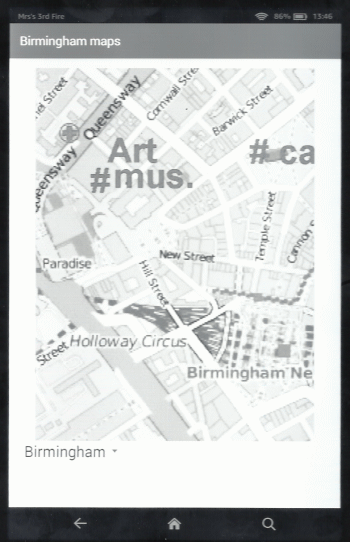
app/res/layout/activity_main.xml - screen format
<?xml version="1.0" encoding="utf-8"?>
<RelativeLayout xmlns:android="http://schemas.android.com/apk/res/android"
xmlns:tools="http://schemas.android.com/tools" android:layout_width="match_parent"
android:layout_height="match_parent" android:paddingLeft="@dimen/activity_horizontal_margin"
android:paddingRight="@dimen/activity_horizontal_margin"
android:paddingTop="@dimen/activity_vertical_margin"
android:paddingBottom="@dimen/activity_vertical_margin" tools:context=".MainActivity"
android:id="@+id/brummap"
>
<!-- line 1, starting in centre -->
<ImageView
android:id="@+id/brum21"
android:tag="brum21"
android:src="@drawable/brum0201"
android:layout_width="wrap_content"
android:layout_height="wrap_content"
android:contentDescription="@string/mapDesc"
android:layout_centerHorizontal="true"
android:onClick="moveUp"
/>
<ImageView
android:id="@+id/brum11"
android:tag="brum11"
android:src="@drawable/brum0101"
android:layout_width="wrap_content"
android:layout_height="wrap_content"
android:contentDescription="@string/mapDesc"
android:layout_toLeftOf="@id/brum21"
android:layout_toStartOf="@id/brum21"
android:onClick="moveLeftUp"
/>
<ImageView
android:id="@+id/brum31"
android:tag="brum31"
android:src="@drawable/brum0301"
android:layout_width="wrap_content"
android:layout_height="wrap_content"
android:contentDescription="@string/mapDesc"
android:layout_toRightOf="@id/brum21"
android:layout_toEndOf="@id/brum21"
android:onClick="moveRightUp"
/>
<!-- line 2, starting in centre -->
<ImageView
android:id="@+id/brum22"
android:tag="brum22"
android:src="@drawable/brum0202"
android:layout_width="wrap_content"
android:layout_height="wrap_content"
android:contentDescription="@string/mapDesc"
android:layout_below="@id/brum21"
android:layout_centerHorizontal="true"
/>
<ImageView
android:id="@+id/brum12"
android:tag="brum12"
android:src="@drawable/brum0102"
android:layout_width="wrap_content"
android:layout_height="wrap_content"
android:contentDescription="@string/mapDesc"
android:layout_below="@id/brum21"
android:layout_toLeftOf="@id/brum22"
android:layout_toStartOf="@id/brum22"
android:onClick="moveLeft"
/>
<ImageView
android:id="@+id/brum32"
android:tag="brum32"
android:src="@drawable/brum0302"
android:layout_width="wrap_content"
android:layout_height="wrap_content"
android:contentDescription="@string/mapDesc"
android:layout_below="@id/brum21"
android:layout_toRightOf="@id/brum22"
android:layout_toEndOf="@id/brum22"
android:onClick="moveRight"
/>
<!-- line 3, starting in centre -->
<ImageView
android:id="@+id/brum23"
android:tag="brum23"
android:src="@drawable/brum0203"
android:layout_width="wrap_content"
android:layout_height="wrap_content"
android:contentDescription="@string/mapDesc"
android:layout_below="@id/brum22"
android:layout_centerHorizontal="true"
/>
<ImageView
android:id="@+id/brum13"
android:tag="brum13"
android:src="@drawable/brum0103"
android:layout_width="wrap_content"
android:layout_height="wrap_content"
android:contentDescription="@string/mapDesc"
android:layout_below="@id/brum22"
android:layout_toLeftOf="@id/brum23"
android:layout_toStartOf="@id/brum23"
android:onClick="moveLeft"
/>
<ImageView
android:id="@+id/brum33"
android:tag="brum33"
android:src="@drawable/brum0303"
android:layout_width="wrap_content"
android:layout_height="wrap_content"
android:contentDescription="@string/mapDesc"
android:layout_below="@id/brum22"
android:layout_toRightOf="@id/brum23"
android:layout_toEndOf="@id/brum23"
android:onClick="moveRight"
/>
<!-- line 4, starting in centre -->
<ImageView
android:id="@+id/brum24"
android:tag="brum24"
android:src="@drawable/brum0204"
android:layout_width="wrap_content"
android:layout_height="wrap_content"
android:contentDescription="@string/mapDesc"
android:layout_centerHorizontal="true"
android:layout_below="@id/brum23"
android:onClick="moveDown"
/>
<ImageView
android:id="@+id/brum14"
android:tag="brum14"
android:src="@drawable/brum0104"
android:layout_width="wrap_content"
android:layout_height="wrap_content"
android:contentDescription="@string/mapDesc"
android:layout_below="@id/brum23"
android:layout_toLeftOf="@id/brum24"
android:layout_toStartOf="@id/brum24"
android:onClick="moveLeftDown"
/>
<ImageView
android:id="@+id/brum34"
android:tag="brum34"
android:src="@drawable/brum0304"
android:layout_width="wrap_content"
android:layout_height="wrap_content"
android:contentDescription="@string/mapDesc"
android:layout_below="@id/brum23"
android:layout_toRightOf="@id/brum24"
android:layout_toEndOf="@id/brum24"
android:onClick="moveRightDown"
/>
<!-- spinner (drop dowm menu) to select Birmingham or Dudley -->
<Spinner
android:id="@+id/mapDistrict"
android:layout_width="wrap_content"
android:layout_height="wrap_content"
android:layout_below="@id/brum14"
/>
</RelativeLayout>
app/java/com.(the project name)/MainActivity - main code for app
package com.edkins.brummap;
import android.support.v7.app.AppCompatActivity;
import android.os.Bundle;
import android.view.View;
import android.widget.AdapterView;
import android.widget.ArrayAdapter;
import android.widget.ImageView;
import android.widget.RelativeLayout;
import android.widget.Spinner;
public class MainActivity extends AppCompatActivity implements AdapterView.OnItemSelectedListener {
int xmax = 24;
int ymax = 24;
int x = 9;
int y = 6;
int district = 0;
protected void onCreate(Bundle savedInstanceState) {
super.onCreate(savedInstanceState);
setContentView(R.layout.activity_main);
Spinner spinner = (Spinner) findViewById(R.id.mapDistrict);
// Create an ArrayAdapter using the string array and a default spinner layout
ArrayAdapter<CharSequence> adapter = ArrayAdapter.createFromResource(this,
R.array.districts, android.R.layout.simple_spinner_item);
// Specify the layout to use when the list of choices appears
adapter.setDropDownViewResource(android.R.layout.simple_spinner_dropdown_item);
// Apply the adapter to the spinner
spinner.setAdapter(adapter);
spinner.setOnItemSelectedListener(this);
redo();
}
// Redo screen (with new position
public void redo() {
for (int i = 0; i < 3; i++) {
for (int j = 0; j < 4; j++) {
String screenName = getString(R.string.nameBrum);
screenName = screenName + String.format("%01d", i+1);
screenName = screenName + String.format("%01d", j+1);
String mapName;
if (district==0) {mapName = getString(R.string.nameBrum);}
else {mapName = getString(R.string.nameDudley);}
mapName = mapName + String.format("%02d", i+x);
mapName = mapName + String.format("%02d", j+y);
RelativeLayout rl = (RelativeLayout) findViewById(R.id.brummap);
ImageView bit = (ImageView) rl.findViewWithTag(screenName);
int id = getResources().getIdentifier(mapName, "drawable", getPackageName());
bit.setImageResource(id);
}
}
}
// Move Left and Up
public void moveLeftUp(View view) {
if (x>1) {x--;}
if (y>1) {y--;}
redo();
}
// Move Up
public void moveUp(View view) {
if (y>1) {y--;}
redo();
}
// Move Right and Up
public void moveRightUp(View view) {
if (x<(xmax-2)) {x++;}
if (y>1) {y--;}
redo();
}
// Move Left
public void moveLeft(View view) {
if (x>1) {x--;}
redo();
}
// Move Right
public void moveRight(View view) {
if (x<(xmax-2)) {x++;}
redo();
}
// Move Left and Down
public void moveLeftDown(View view) {
if (x>1) {x--;}
if (y<(ymax-3)) {y++;}
redo();
}
// Move Down
public void moveDown(View view) {
if (y<(ymax-3)) {y++;}
redo();
}
// Move Right and Down
public void moveRightDown(View view) {
if (x<(xmax-2)) {x++;}
if (y<(ymax-3)) {y++;}
redo();
}
// Select a district
public void onItemSelected(AdapterView<?> parent, View view, int pos, long id) {
if (pos==0) {
xmax = 24; ymax = 24;
x = 9; y = 6;
district = 0;
}
else if (pos==1) {
xmax = 23; ymax = 11;
x = 7; y = 1;
district = 1;
}
redo();
}
// This code is needed, but not used
public void onNothingSelected(AdapterView<?> parent) {
}
}
Index to my other websites
© Jo Edkins 2016